core.addCustomBatchAction
Allows addition of custom batch operations. With this customization, you can implement actions that run on multiple selected instances (in a listing).
Usage:
javascript
core.addCustomBatchAction({
    key: `<generic-key-for-action>`,
    label: "<label-of-the-button>",
    group: "<the-group-button-name>",
    isAllowed: function(definitionM){
        ...
        return true or false
    },
    execute: function(definitionId, indexedInstancesM, ctx) {
        ...
    },
    executeOnQuery: async function(definitionId, query, ctx) {
        ...
    }
})
Arguments:
| Argument | Description | Required |
|---|---|---|
key | A key that serves as an identifier for that action. | YES |
label | Name of the action. Also the name that appears in the action button. | YES |
group | Name of the group we wish to show this action under. If multiple actions, with different names, share the same group, they will appear as children of said group. | YES |
isAllowed | Function responsible for making sure if running this action is allowed for a given definition. | YES |
execute | Function responsible for executing the actual batch action we wish to run on our selected instances. | |
executeOnQuery | Same goal as execute, but it is ran in cases when all the selected instances are NOT shown on a listing (meaning part of them are in the next page of the listing for example) - i.e when all of the selected instances are not visible in the current page. |
isAllowed function arguments:
| Argument | Description |
|---|---|
definitionM | Information regarding the current (seen) definition. |
execute function arguments:
| Argument | Description |
|---|---|
definitionId | ID of the current definition. |
indexedInstancesM | List with the selected instances. |
{columnLabels, presenter} | Respectively, column names and object responsible for showing listing. |
executeOnQuery function arguments:
| Argument | Description |
|---|---|
definitionM | Information regarding the current (seen) definition. |
query | The query that was used to selected / view all the selected instances. |
{columnLabels, presenter} | Respectively, column names and object responsible for showing listing. |
Example:
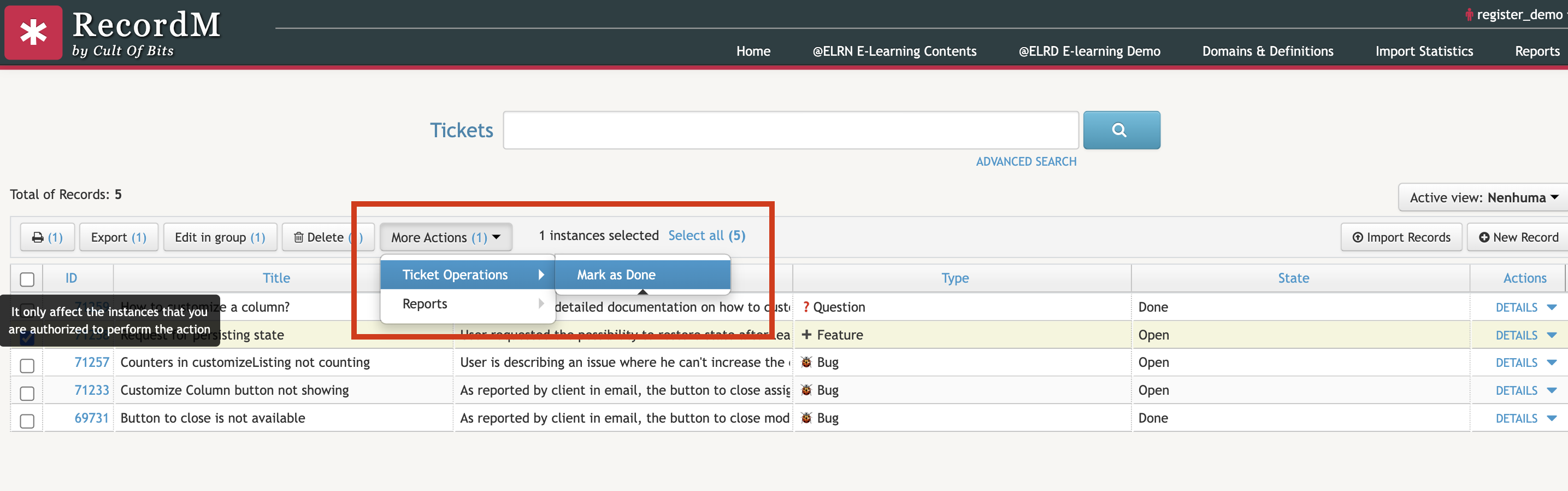
For this example, we programmed a custom batch action that sets the set the selected Tickets' state to 'Done'.
javascript
cob.custom.customize.push(function (core, utils, ui) {
  const DEFINITION = "Tickets";

  core.addCustomBatchAction({
    key: `tickets-set-done`,
    label: "Mark as Done",
    group: "Ticket Operations",
    isAllowed: function (definitionM) {
			return definitionM['data']['name'] === DEFINITION
    },
    execute: function (definitionId, indexedInstancesM, {columnLabels, presenter}) {
      indexedInstancesM.forEach(async (instance) => {
        if (instance['data']['state'][0] === "Open") {
          const updates = {
            "type": DEFINITION, "condition": `id:${instance['data']['instanceId']}`,
            "values": {
              "State": "Done"
            }
          }
          await axios.put("/recordm/recordm/instances/integration", updates)
        }
      })
      location.reload()
    },
    executeOnQuery: async function (definitionId, query, {columnLabels, presenter}) {
      return
    }
  })
});