
AuthM – Authentication & SSO Manager
AuthM is a powerful authentication service within the CoB Platform, designed to centralize and streamline user access management across systems. It is primarily responsible for enabling Single Sign-On (SSO) capabilities through support for widely adopted protocols like OpenID Connect and SAML2.
Key Features
- Single Sign-On (SSO): Seamlessly authenticate users across multiple services with a single login.
- OpenID Connect & SAML2 Support: Integrates with external identity providers such as Google, Okta, Auth0, and more.
- Interoperability: Works as the central point of authentication across the entire CoB ecosystem, enabling consistent identity handling.
- Custom Provisioning Logic: Supports custom Groovy scripts to define user attributes and groups dynamically during authentication.
- Auto-Provisioning & Group Mapping: Automatically creates or updates user information and assigns them to appropriate groups based on identity provider data.
Use Cases
- Enterprise organizations using external Identity Providers for centralized login.
- Systems requiring unified identity management and secure access control.
- Scenarios where integration with cloud-based IdPs (like Google Workspace or Entra ID) is needed.
SSO Flow Example Using Google and RecordM
Below is an example of the SSO flow when using Google as the identity provider and RecordM as the final service being accessed:
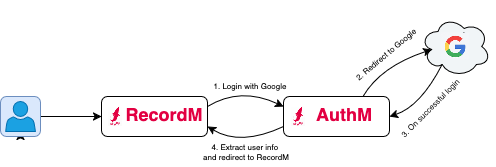
- The user accesses RecordM directly and press the Login with Google button.
- The request is redirected to AuthM, which in turn redirects to Google for authentication.
- Upon successful login, Google redirects back to AuthM, which extracts the necessary user information.
- The user is then redirected back to RecordM, now authenticated.
Configuration
AuthM requires initial setup to define trusted identity providers, configure callback URLs, and establish group mapping logic. Once configured, all applications within the CoB Platform can delegate authentication to AuthM, benefiting from a unified login experience.
INFO
AuthM may not be available by default. To enable this service on your client server, please contact support through the standard communication channels.
To configure AuthM, edit the configuration file located at /authm/application.properties in the server repository, and deploy the changes using cob-cli.
Example:
1. OpenId: Auth0 sample configuration
# openid.configs[0].key=auth0
# openid.configs[0].label=Auth0
# openid.configs[0].client-id=<client-id>
# openid.configs[0].client-secret=<client-secret>
# openid.configs[0].base-login-url=https://<auth0-domain>/authorize
# openid.configs[0].access-token-url=https://<auth0-domain>/oauth/token
# openid.configs[0].user-info-url=https://<auth0-domain>/userinfo
2. Saml2: Okta sample configuration
# saml2.configs[0].key=okta
# saml2.configs[0].label=Okta
# saml2.configs[0].keystore-file=/etc/authm/keystors/okta.jks
# saml2.configs[0].idp-metadata-file=/etc/authm/okta-metadata.xml
INFO
For our applications, the defined SP Entity ID in AuthM is cob-authm. This should be used whenever configuring SSO integrations
INFO
You can configure multiple authentication profiles for OpenID or SAML2 by incrementing the index (e.g., [0], [1], etc.).