Content only available in english
core.customizeAllColumns
Customize all columns of a search result that fit the given criteria.
Usage:
javascript
core.customizeAllColumns(<regex>, function(cellContainer, esDoc, colDef) => {
   ...
})
Arguments:
| Argument | Description | Required |
|---|---|---|
regex | Regex that will be used to match the definition name | YES |
function | Callback function responsible to implement the custom action of an instance. | YES |
Function arguments:
| Argument | Description |
|---|---|
cellContainer | The DOM container for the current cell the function receives. |
esDoc | The instance itself for the current cell (or row). |
colDef | The definition of the current column the function receives. |
Example:
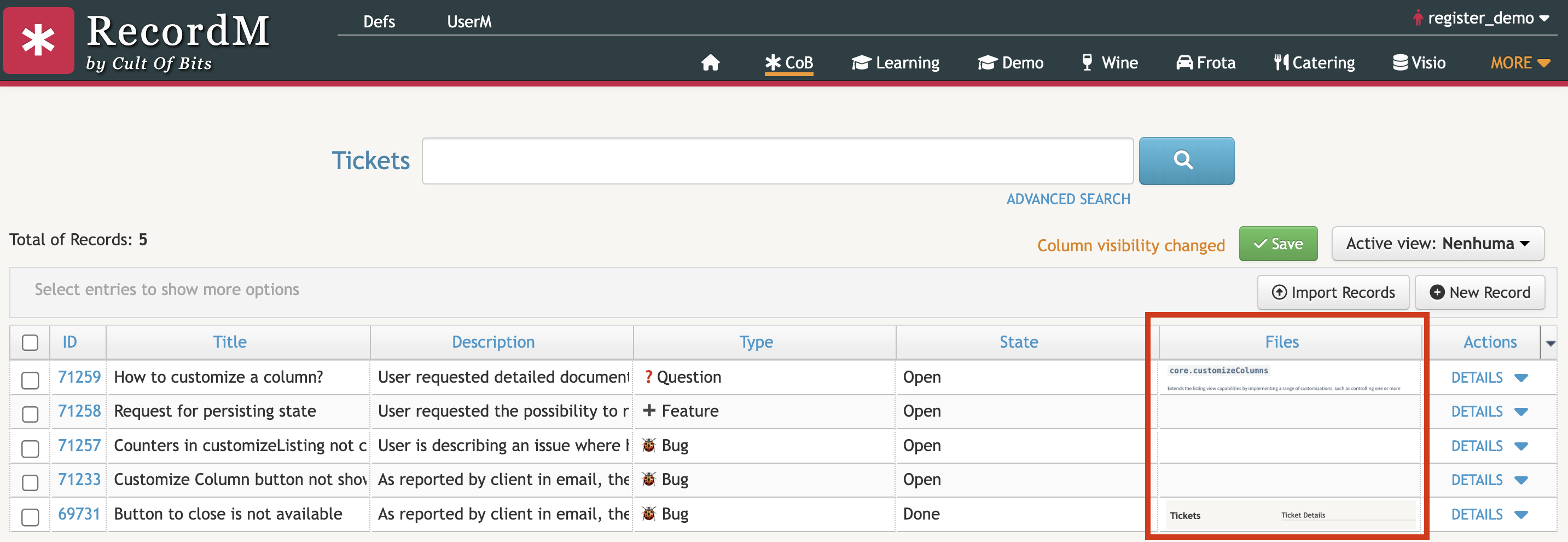
In this example, the customizeAllColumns customization is being used to show a small image preview, if the ticket has an image file attached. The image is only shown if the Tickets' instances have uploaded files, and they are recognized as a file (via extension). You can see a small preview of the attached images of their respective Tickets, and they can be downloaded by clicking them.
javascript
cob.custom.customize.push(function (core, utils, ui) {
  const DEFINITION_REGEX = "Tick.*";
  const imgFieldMatcher = /[$](image|file)(\(.+\))?/;
  const imgRegex = /([a-z\-_0-9\/\:\.]*\.(jpg|jpeg|png|gif))/i

  core.customizeAllColumns(DEFINITION_REGEX, function (node, esDoc, fieldInfo) {
    // Match column keywords with $file or $image
    if (imgFieldMatcher.test(fieldInfo.fieldDefDescription)) {
      for (let childNode of node.childNodes) {
        if (childNode.tagName == "A") {
          const imgLink = childNode.href
          if (imgLink && imgLink.match(imgRegex)) {
            childNode.innerHTML = `<img src="${imgLink}">`
          }
        }
      }
    }
  });
});