
Conditional Fields
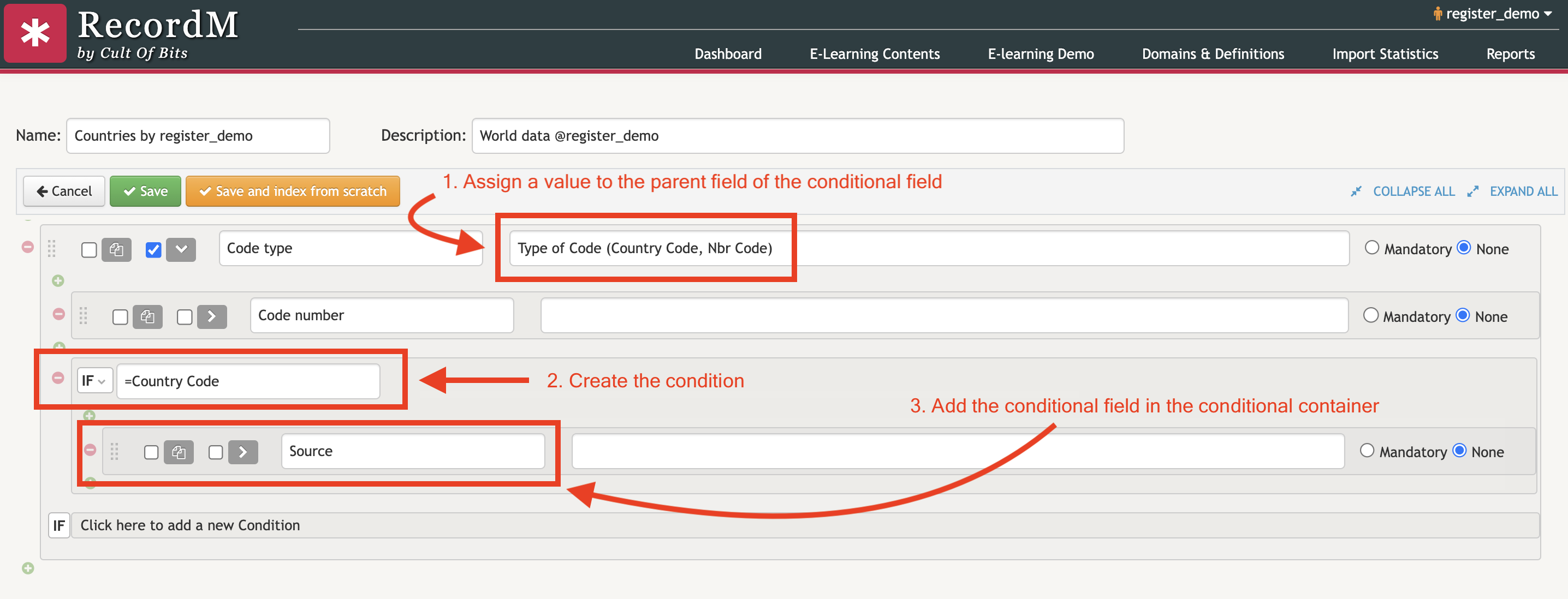
Sometimes, you may want a field to be visible in an instance only if a certain condition is met. To create a conditional field, you must first assign a value to the field to which you want to apply a condition. Next, you need to create the condition that will determine the visibility of the field. Finally, you can add the conditional field in the container included below the condition.
TIP
Conditions can be collapsed or expanded by clicking on the IF button with a right arrow next to it.
Supported Condition Types
| Condition Type | Definition |
|---|---|
| equality (=) | Fields with an equality condition are only visibile if the parent field value equals the given value (or equals any of the values in a list separated by comma). |
| difference (!) | Fields with a not-equals condition are only visible if the parent field value is different from the given value (or is not any of the values in a comma-separated list). |
| higher than (>) or equals (>=) | Fields with a higher-than (or equals) condition are only visible if the parent field value is greater than (or equals) the given value |
| lower than (<) or equals (<=) | Fields with a lower-than (or equals) condition are only visible if the parent field value is lower than (or equals) to the given value . |