$securedAccess() - Secured Fields
This keyword is used to display, inside the current instance, values that are stored in a separate, access-controlled definition, without ever duplicating those values in the current definition. Unlike $restricted(), which hides a field of the current instance from users outside a given group, $securedAccess() keeps the sensitive data in a definition of its own — with its own permissions governing direct access to it — and pulls it in, masked, only where it is needed.
$securedAccess() is applied to a group field. The fields inside that group use $securedInfo() to choose which fields of the secured definition are shown.
Usage:
$securedAccess(definition_name,reference_field)Options:
definition_name: the name of the secured definition that holds the sensitive fieldsreference_field: the name of the reference field in the secured definition that points back to the current definition. RecordM uses it to find which instance of the secured definition belongs to the instance being shown
| Parameter | Description |
|---|---|
definition_name | The secured definition where the sensitive values are stored. Its own field keywords ($restricted(), $editForGroup(), …) and permissions continue to apply. |
reference_field | The reference field declared in the secured definition, pointing at the current definition. The secured instance is the one whose reference_field matches the current instance. |
WARNING
$securedAccess() must be used on a field that is also declared as $group. The keyword has no effect on a regular field. It is normally combined with $expanded so the secured block is open when the instance is displayed.
$securedInfo() - Showing a secured field
Each field inside a $securedAccess() group declares which field of the secured definition it displays.
$securedInfo(remote_field)Options:
remote_field: the name of the field in the secured definition whose value is shown in the current instance
WARNING
$securedInfo() is only valid on a direct child field of a group configured with $securedAccess(). It is not resolved on fields placed outside that group, nor on fields nested one level deeper inside a subgroup of it — the secured values must be listed immediately under the $securedAccess() group.
How the values are displayed
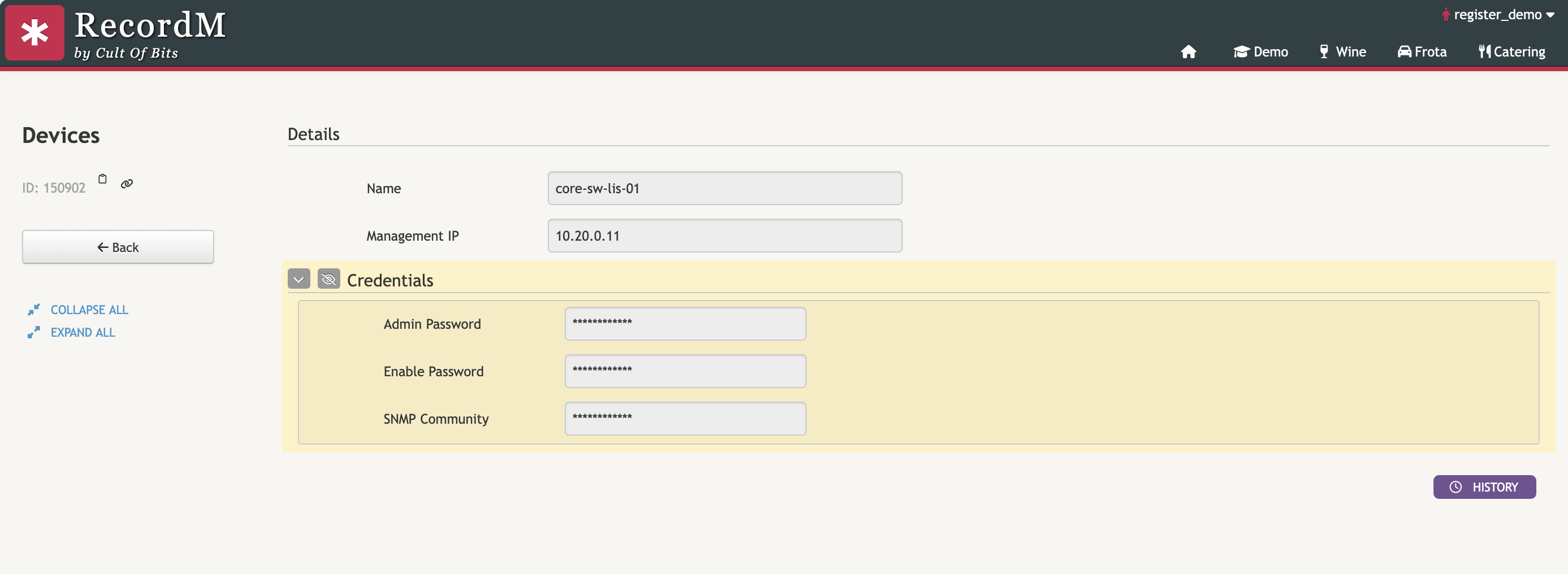
A $securedAccess() group is rendered as a highlighted block, visually separated from the rest of the instance, with a reveal button (the crossed-out eye) that switches the secured values between their masked form and their real value.
INFO
The values inside the group are masked by default — each one is shown as ************ — so opening or printing an instance never exposes the sensitive data by accident. The values are never stored in the current definition: they are read from the secured definition each time the instance is displayed.
$securedAccess() is a masking and auditing mechanism, not an access barrier on the displaying instance. Any user with the privilege to see the instance that wraps the sensitive information will be able to reveal it: the crossed-out eye is there so the values are not exposed by accident when the instance is opened, printed or shared on screen, and so that each reveal is registered. Restricting who can reach the values at all is done the usual way by the permissions of the secured definition, which govern direct access to it, and by the field keywords declared on the group, not by $securedAccess() itself.
Examples
1. Device credentials kept out of the equipment inventory
The Devices definition is the operation's equipment inventory: everyone in support consults it to find a device's vendor, model and management address. The access credentials of those devices are needed in the same place — an operator troubleshooting a device should not have to go looking for them elsewhere — but they should not sit in plain sight in the inventory, they should exist in a single place instead of being copied into every device record, and each time someone reads them that should be traceable.
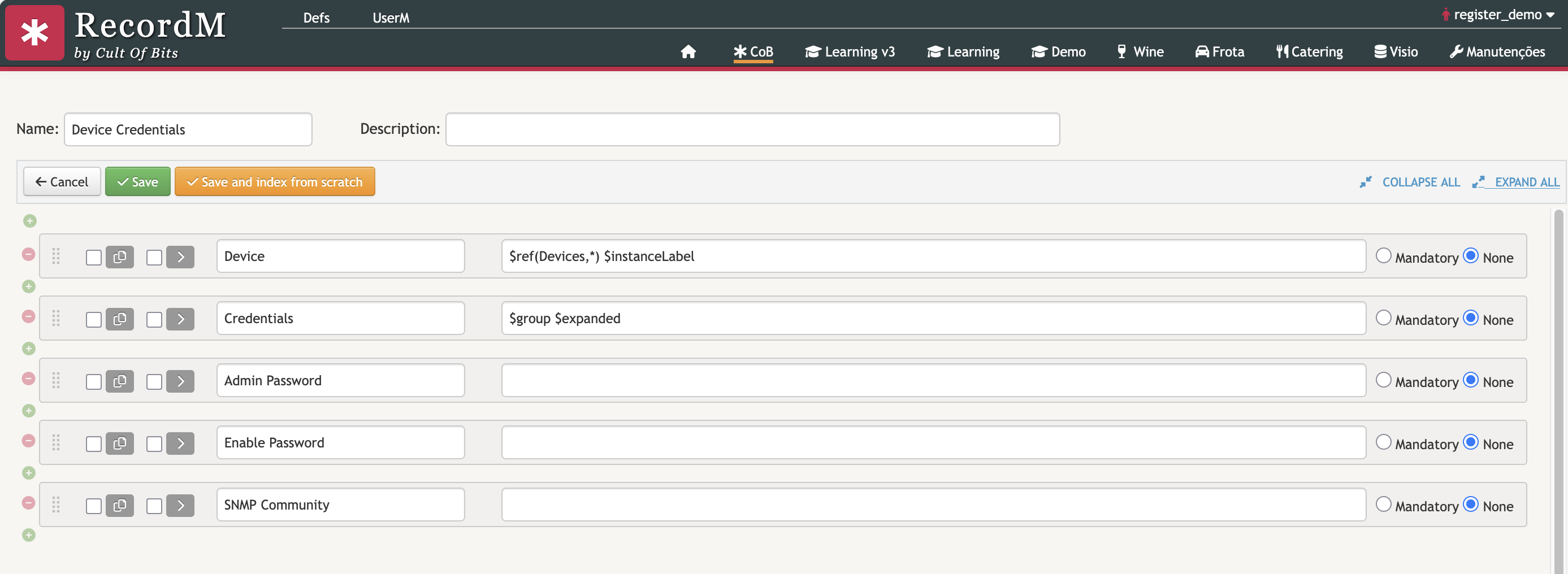
The credentials are therefore stored in their own definition, Device Credentials, which has a reference field Device pointing at Devices:
Device              $ref(Devices)
Admin Password
Enable Password
SNMP Community
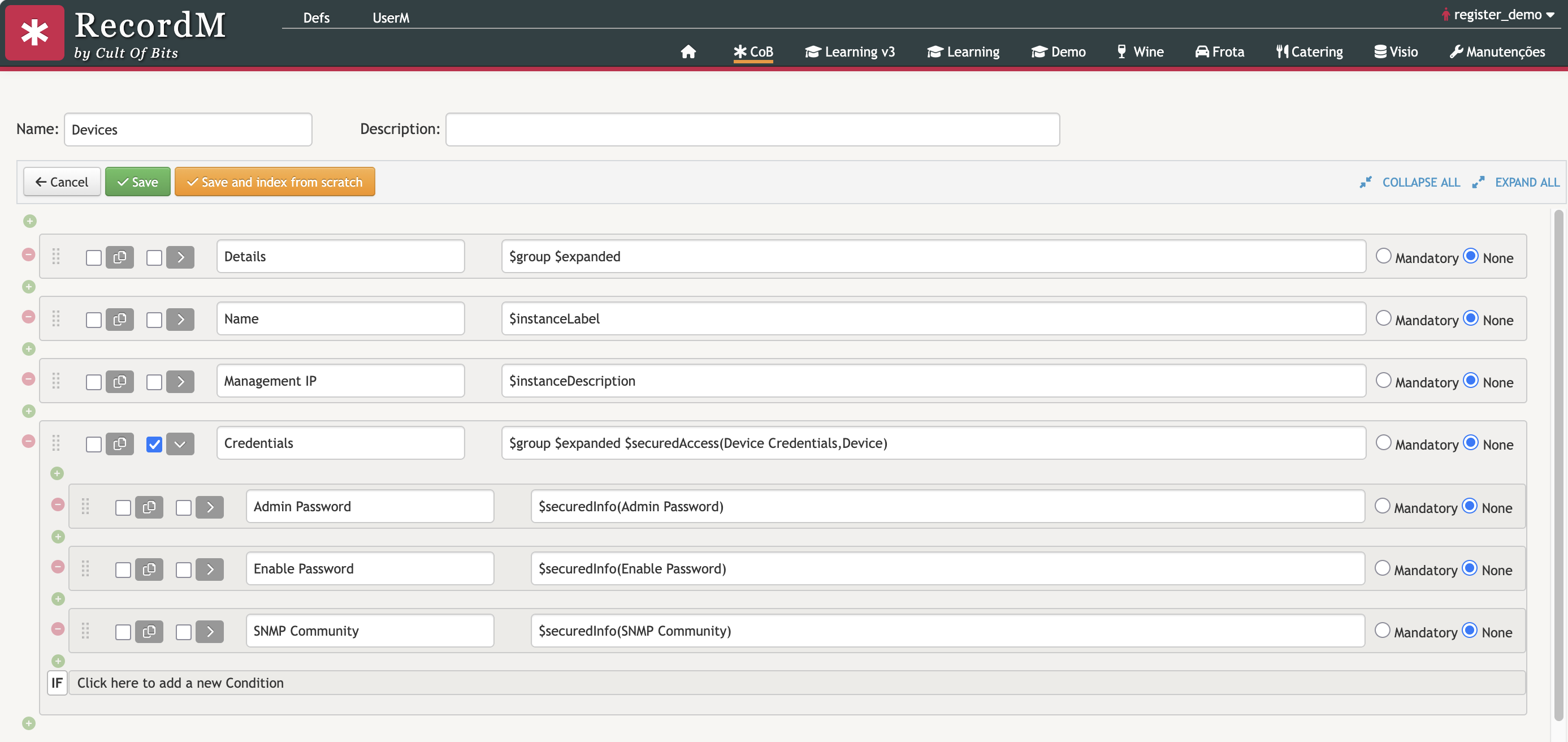
Devices then shows them through a secured group:
Name                $instanceLabel
Management IP
Credentials         $group $expanded $securedAccess(Device Credentials,Device)
  Admin Password        $securedInfo(Admin Password)
  Enable Password       $securedInfo(Enable Password)
  SNMP Community        $securedInfo(SNMP Community)
In this example:
Credentialsis the group that carries the secured access.$expandedkeeps it open when the instance is displayed.Device Credentialsis the definition holding the passwords. It is the single place where they live, and the only one whose permissions need to be reviewed for direct access.Deviceis the reference field insideDevice Credentialsthat points atDevices. The credentials shown are the ones whoseDeviceis the device being displayed.- Each child field displays one field of that secured instance.
WARNING
This keeps the credentials masked and their reveals traceable, but it does not stop a support user from revealing them: whoever can open the Devices instance can click the eye. If the credentials must not be reachable at all by users outside the network team, restrict the Credentials group itself so the block is only rendered for that group.
The instance then shows a Credentials block with the three values masked, ready to be revealed when a user clicks in the eye icon: